/
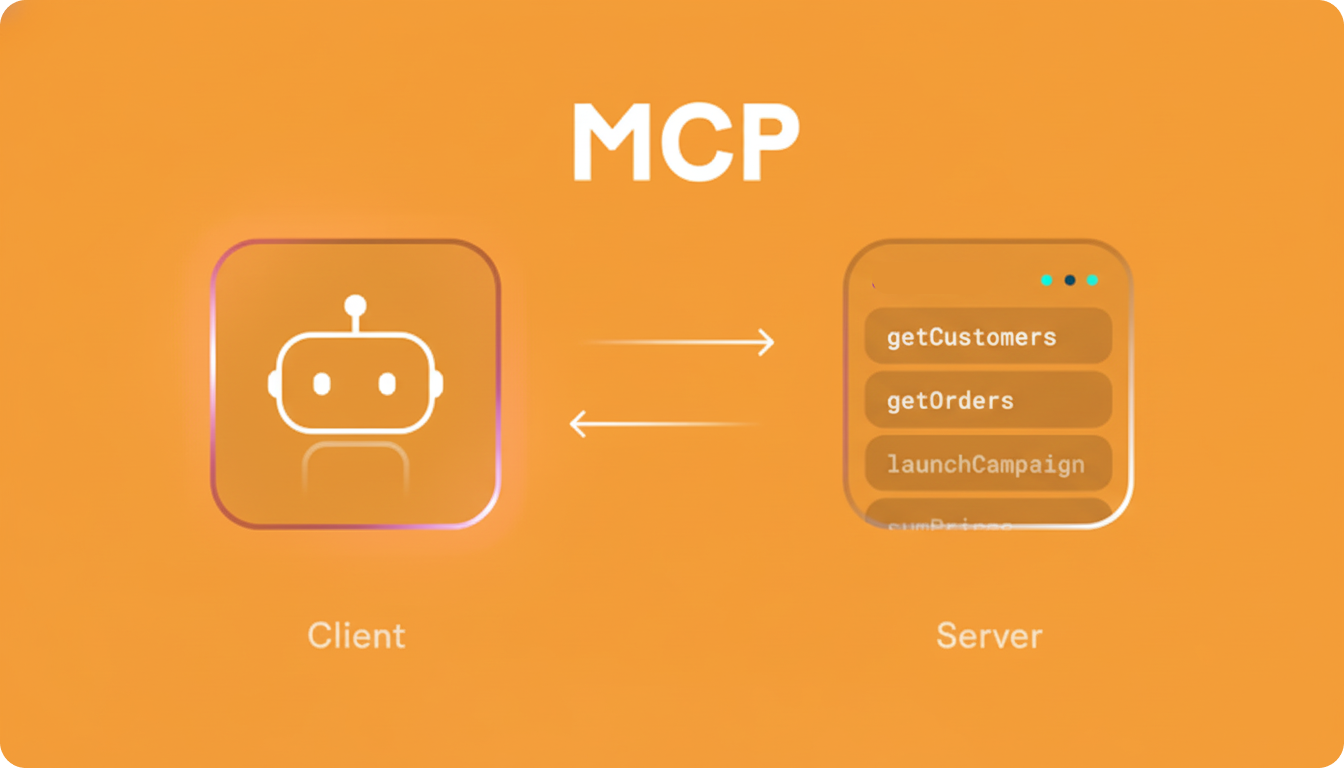
MCP (Model Context Protocol) servers are middleware components that connect AI models to external data sources and tools.
Think of them as specialized bridges that allow AI models to:
- Access real-time data from the web
- Interact with local files and databases
- Integrate with APIs and external services
- Perform specialized operations beyond built-in AI capabilities
Unlike traditional integrations that require custom code for every platform, MCP servers provide a standardized protocol that works across compatible AI systems. This helps solve the problem of fragmented AI integrations.
MCP servers provide several key advantages for developers.
Extended AI Capabilities§
Enable AI models to perform advanced tasks such as:
- File operations
- Web scraping
- Database queries
- API integrations
Reduced Hallucinations§
Giving AI direct access to verified data sources helps reduce incorrect or fabricated information.
Enhanced Productivity§
Developers can automate complex workflows by allowing AI assistants to interact directly with tools and data sources.
Standardized Integrations§
A single protocol works across multiple AI models, reducing the need for custom integrations.
Before working with MCP servers, ensure your environment meets the following requirements.
Node.js§
node --versionRequires Node.js v18 or newer.
Python§
python --versionRequires Python v3.8 or newer.
Install UV Package Manager§
pip install uvVerify installation:
uv --versionInstalling Your First MCP Server with Cline (VS Code)§
- Open the Cline extension in VS Code
- Click the MCP Server tab
- Click Edit MCP Settings
- Replace the configuration with the appropriate setup
Configuration for Windows§
\{
  "mcpServers": \{
    "mcp-installer": \{
      "command": "cmd.exe",
      "args": ["/c", "npx", "-y", "@anaisbetts/mcp-installer"]
    \}
  \}
\}
Configuration for Mac and Linux§
\{
  "mcpServers": \{
    "mcp-installer": \{
      "command": "npx",
      "args": ["@anaisbetts/mcp-installer"]
    \}
  \}
\}
After saving the file:
- Cline will detect the change automatically
- The MCP installer will be downloaded and started
- You can verify the server status in the MCP settings UI
Once the MCP installer is running, you can easily install additional servers.
Example request:
Install the MCP server named
mcp-server-fetch— ensure the MCP settings are updated — use uvx or python to run the server.
Cline will automatically:
- Install the Python package
- Update the MCP configuration file
- Start the server
Updated MCP Configuration Example§
\{
  "mcpServers": \{
    "mcp-installer": \{
      "command": "cmd.exe",
      "args": ["/c", "npx", "-y", "@anaisbetts/mcp-installer"]
    \},
    "mcp-server-fetch": \{
      "command": "uvx",
      "args": ["mcp-server-fetch"]
    \}
  \}
\}
You can also install MCP servers directly from GitHub repositories.
Steps§
- Find an MCP server repository on GitHub
- Provide the repository URL to Cline
- Cline will automatically:
Clone the repository Build the server (if needed) * Update the MCP configuration
Example Interaction§
User: Cline, I want to add the MCP server for Brave browser control.
Here is the GitHub link:
https://github.com/modelcontextprotocol/servers/tree/main/src/brave

Cline: Cloning repository to MCP directory. It contains a package.json file.
Should I run npm run build?

User: Yes.

Cline: Build complete. This server requires the browser path.
Where is your Brave browser executable?

User: /Applications/Brave Browser.app/Contents/MacOS/Brave Browser

Cline: Configuration updated and added to cline_mcp_settings.json.
File and Data Access§
- Filesystem – Secure file operations with configurable access controls
- Google Drive – File access and search
- Box – Cloud storage access
Databases and Data Analysis§
- PostgreSQL – Read-only database access with schema inspection
- MySQL – Database integration with configurable controls
- MongoDB – Direct database interaction
- Snowflake – Data warehouse integration
- CSV Data Exploration – Dataset analysis
Web and APIs§
- Fetch – Web content fetching optimized for LLMs
- Puppeteer / Playwright – Browser automation and scraping
- Brave Search – Web search integration
- Google Maps – Location services and directions
Development Tools§
- GitHub / GitLab – Repository integration
- Git – Search and analyze repositories
- Docker – Manage containers and logs
- Kubernetes – Control cluster resources
AI Tools§
- OpenAI – Query models directly from Claude
- Perplexity – AI search integration
- HuggingFace Spaces – Run ML applications
- PiAPI – Media generation services
Productivity Tools§
- Notion – Task and workspace management
- Slack – Messaging and channel automation
- Airtable – Database integration
- Apple Notes – Notes management
Enhanced Code Development§
- Explore large repositories with GitHub MCP
- Analyze commit history using Git MCP
- Automate pull-request reviews
- Generate documentation from codebases
Data Analysis and Visualization§
- Connect AI to PostgreSQL or MySQL databases
- Clean datasets automatically
- Generate charts using Vega-Lite MCP
- Create automated reports
Web Automation§
- Scrape structured data using Playwright or Puppeteer
- Run automated browser testing
- Monitor websites for updates
- Automate online research workflows
Productivity Automation§
- Manage documents across Google Drive, Box, and local files
- Prepare meeting insights automatically
- Update tasks in Notion or Airtable
- Build personal knowledge bases
AI Integration and Extension§
- Use multiple AI models for specialized tasks
- Generate media content using AI tools
- Compare responses across models
- Offload complex reasoning tasks
Claude (Web Interface)§
- Requires MCP servers running locally
- Interaction is more conversational
- Ideal for research and exploratory tasks
Cline (VS Code Extension)§
- Fully integrated with your development environment
- Access to project files and codebase context
- Ideal for developer workflows
Benefits include:
- Easier MCP server management
- Direct interaction with project files
- Faster development workflows
- Cursor
- Windsurf
- Roo Cline
- Continue
MCP servers represent a major evolution in how developers extend AI assistants.
By connecting AI models with external tools, APIs, and data sources, MCP servers unlock powerful workflows such as:
- automated development
- advanced data analysis
- intelligent web automation
- integrated productivity systems
As AI development continues to evolve, MCP servers will play a crucial role in building smarter, more capable AI applications.