Seedance 2.0 vs Kling 3.0: Which AI Video Generator Should You Choose?
Definable AI · February 11, 2026 · 4 min read
Compare Seedance 2.0's multimodal control with Kling 3.0's motion mastery to choose the best AI video generator for your workflow.
Key Takeaways
- Seedance 2.0 offers unmatched compositional control via multimodal references and video editing workflows, with up to 15s outputs.
- Kling 3.0 delivers industry-leading natural motion, fast iteration, and a Motion Brush for painting precise movement paths.
- Choose Seedance when you need granular control, template replication, or to edit existing footage; choose Kling for smoother motion and rapid prototype generation.
- Seedance's flexibility adds complexity and a learning curve, while Kling sacrifices some compositional inputs (no video reference/audio upload) for simplicity and consistency.
The AI video generation landscape has evolved into a battle between two distinct philosophies: Seedance 2.0's multimodal control versus Kling 3.0's motion mastery. Both from Chinese tech giants (ByteDance and Kuaishou respectively), these models represent fundamentally different approaches to video generation. This comparison will help you decide which one fits your workflow.
Quick Comparison
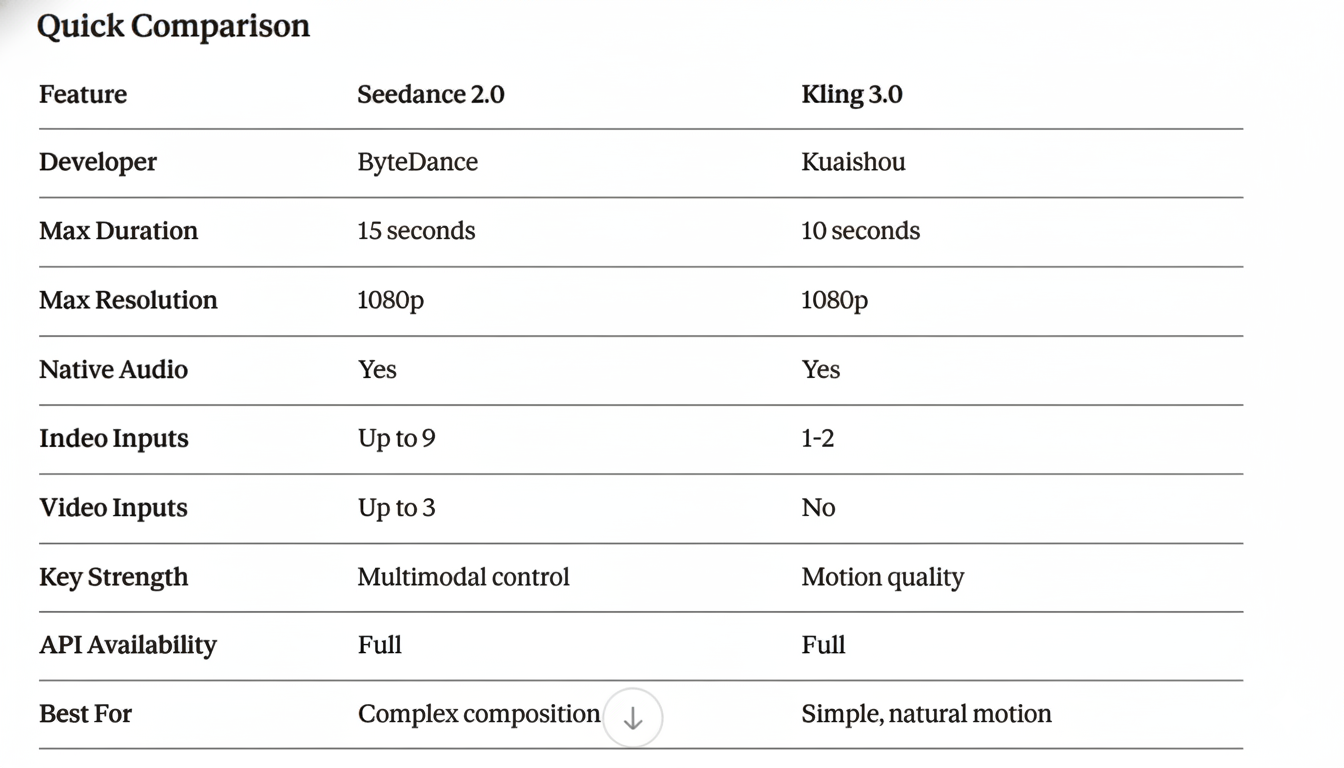
Seedance 2.0: The Multimodal Director
ByteDance's Seedance 2.0 represents a paradigm shift in video generation. Rather than relying on text prompts alone, it accepts images, videos, audio, and text as inputs—giving creators unprecedented control over every aspect of generation.
Key Specifications
- Max Duration: 15 seconds (4-15s selectable)
- Resolution: Up to 1080p
- Inputs: 9 images + 3 videos + 3 audio files + text (12 files max)
- Audio: Native sound effects, music, and dialogue
- Frame Rate: 24fps
Unique Capabilities
1. Multimodal Reference System
Seedance 2.0's defining feature is its ability to extract and combine elements from multiple reference files:
No other model offers this level of compositional control.
2. Motion and Camera Replication
Upload a reference video and Seedance 2.0 extracts:
- Camera movements (dolly, orbit, tracking)
- Action choreography
- Editing rhythm and pacing
- Visual effects and transitions
3. Video Editing Capabilities
Modify existing videos without regenerating from scratch:
- Character replacement
- Scene extension
- Style transfer
- Narrative changes
4. Template Replication
Reference an advertisement, film clip, or creative template—Seedance 2.0 replicates the style with your content.
Strengths
✅ Unmatched control — The @ reference system allows precise direction
✅ Creative flexibility — Combine multiple modalities in one generation
✅ Longest duration — 15 seconds beats most competitors
✅ Production workflows — Edit and extend existing content
✅ Beat-synced editing — Generate music-video-style cuts
Limitations
❌ Complexity — More inputs means more to manage
❌ Learning curve — Mastering the @ system takes practice
❌ Reference-dependent — Best results require good reference materials
API Example
Kling 3.0: The Motion Master
Kuaishou's Kling 3.0 builds on its predecessor's reputation for exceptionally smooth, natural motion. While it lacks Seedance 2.0's multimodal inputs, it excels at generating physically plausible movement from simple prompts.
Key Specifications
- Max Duration: 10 seconds
- Resolution: Up to 1080p at 30fps
- Inputs: Text + optional image(s)
- Audio: Native generation with dialogue support
- Modes: Text-to-video, Image-to-video, Motion Brush
Unique Capabilities
1. Motion Brush
Kling 3.0's motion brush allows users to paint motion paths directly onto source images, specifying exactly where and how elements should move.
2. Professional Mode
A dedicated mode for complex prompts that processes longer and delivers higher fidelity results.
3. Multi-Subject Handling
Strong performance with multiple characters interacting in the same scene, maintaining distinct identities and natural interactions.
Strengths
✅ Natural motion — Industry-leading smoothness and physical accuracy
✅ Simple workflow — Straightforward prompt-to-video without reference complexity
✅ Asian content — Particularly strong with Asian subjects and environments
✅ Consistent quality — Reliable output across different prompt types
✅ Motion Brush — Unique tool for precise motion control
✅ Fast iteration — Quick generation times enable rapid prototyping
Limitations
❌ No video reference — Cannot learn motion from reference videos
❌ No audio input — Cannot sync to uploaded audio
❌ Shorter duration — 10 seconds vs 15 for Seedance 2.0
❌ Less compositional control — Fewer inputs means less precision
API Example
Final words
Frequently Asked Questions
What is the main difference between Seedance 2.0 and Kling 3.0?
Seedance 2.0 focuses on multimodal inputs and deep compositional control using images, videos, audio, and text; Kling 3.0 emphasizes exceptionally smooth, physically plausible motion from simpler prompts.
Which model supports reference video and audio uploads?
Seedance 2.0 accepts video and audio references and can replicate camera moves and choreography, while Kling 3.0 does not support reference video and has limited audio input support.
Which is better for realistic character motion and multi-subject scenes?
Kling 3.0 excels at natural, smooth motion and handling multiple interacting subjects, aided by its Motion Brush tool for precise motion paths.
Can I edit or extend existing videos with these models?
Seedance 2.0 offers editing features like character replacement, scene extension, and style transfer; Kling 3.0 is primarily for generating new clips rather than editing uploaded videos.